Having backups is an expense. Being able to recover from them is a capability, and the gap between the two is where organizations get hurt. Modern ransomware crews hunt down backup infrastructure first, and if your backups share credentials with production or sit on ordinary network shares, they get deleted before the real attack ever lands. This article walks through what a green checkmark actually hides: encryption keys you can't reach, restores no one has ever tested, recovery times that ignore basic network physics, and backup copies quietly crossing borders they shouldn't. Written for IT leaders, public sector teams, and administrators who want to turn untested backups into recovery they can prove.
During an initial risk assessment, almost every executive answers the same way when asked about ransomware mitigation: "We're fine, we have backups running every night."
When I hear this, I wonder if they've ever actually tried to pull those backups down.
Having backups is merely an operational expense. Being able to rapidly recover business operations from those backups is an organizational capability. The massive gap between those two realities is usually discovered at 2:00 AM on a Sunday when your network environment goes dark and the realization sets in that your strategy is not as robust as imagined.
Modern ransomware actors no longer just encrypt production environments. They spend days performing internal reconnaissance to find your backup infrastructure first [1][2]. If your backup servers are tied directly to your primary Active Directory domain, use standard local network shares, or lack immutable storage configurations, they might be deleted or encrypted before the primary payload ever drops.
Most IT teams never see this coming because they are watching a different indicator. An automated daily status email displaying a green checkmark means data was written to a target destination. It does not mean the database blocks are uncorrupted, the operating system will boot on different hardware, or the encryption keys needed to read the data are even accessible. Without regular, automated sandbox restore testing, your data is functionally Schrödinger's backup: it exists and it doesn't, and you won't know which until the moment you need it most.
That green checkmark is a vanity metric. The structural vulnerabilities that actually break recovery live underneath it.
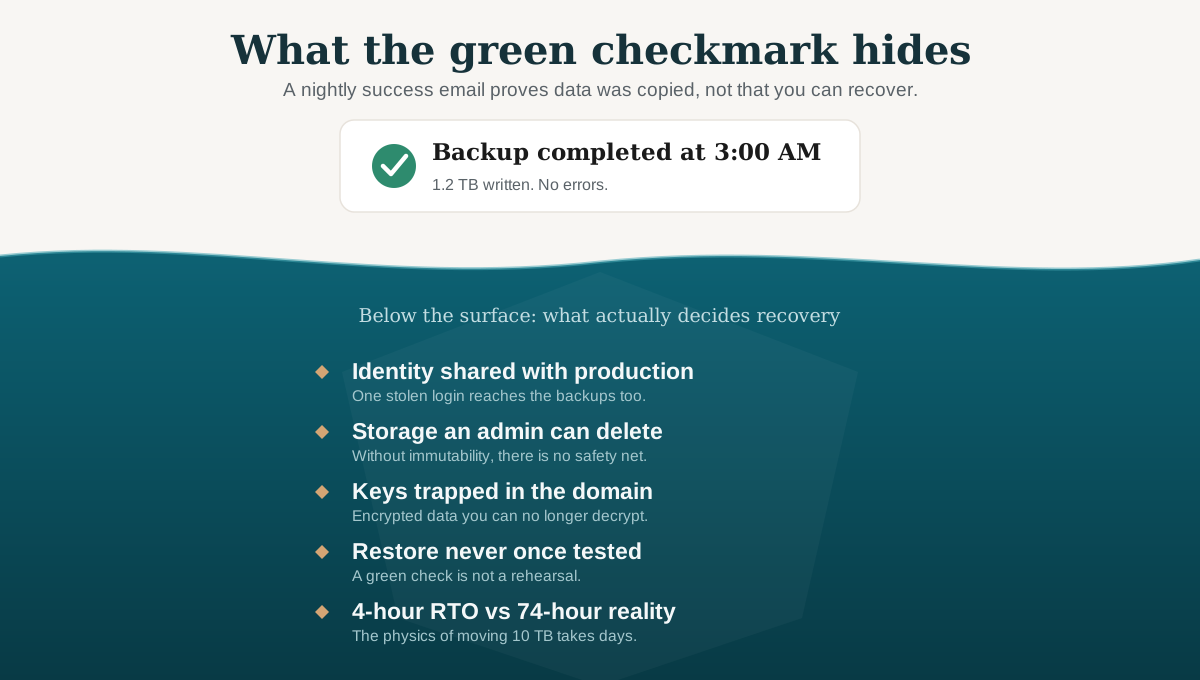
The green checkmark only proves data was copied. Everything that decides whether you can actually recover sits below the surface.
1. The Key Management Paradox
If your backups are encrypted, as they must be to comply with standard security baselines, where are the encryption keys stored? If those keys are managed by a local server that gets encrypted during a ransomware event, you cannot decrypt your data, even if the backup files themselves remain untouched. You have locked the thieves out, but you locked yourself out, too.
This remains a common failure mode in environments where key management has not been deliberately separated from production systems [3].
2. Data Governance and Sovereignty Violations
Many automated cloud backup utilities default to low-cost regional replication options. If your primary tenant is in Canada but your backup software is configured to replicate data to a US-based data center for redundancy, that replication may be happening without anyone on your team having made a deliberate decision about it. Organizations may unknowingly send their data across borders. They just never checked the default.
Data residency and data sovereignty are not the same thing. Data can be stored in Canada and still be subject to competing legal access claims if the cloud provider is headquartered in or operates under the laws of another jurisdiction [5]. That distinction matters, and it is easy to miss when the backup configuration screen just asks you to pick a replication tier.
For organizations operating under Protected B requirements [4], Indigenous data sovereignty frameworks [5], or contractual residency obligations, allowing institutional or community data to cross jurisdictional and colonial borders can result in a governance failure. Redundancy is important. But it should not come at the cost of jurisdictional control.
3. The Fiction of Unvalidated RTOs
Business leaders frequently state they require a Recovery Time Objective (RTO) of four hours.
Let's look at the actual physics of a restore. If you have 10 Terabytes of data to pull down from a cloud tier over a standard business internet connection (say, a 500 Mbps link operating at a realistic 60% real-world throughput), here is the napkin math (approximates):
Throughput = 500 Mbps x 0.60 = 300 Mbps
Total Bits = 10 TB x 1,000,000 MB/TB x 8 bits/byte = 80,000,000 Mb
Transfer Time = 80,000,000 Mb / 300 Mbps = ~266,667 seconds = roughly 74 hours
That is over three days of continuous, uninterrupted data transfer just to move the bits. It does not account for rebuilding bare-metal operating systems, configuring applications, or validating database integrity. Your four-hour RTO might not be fully aligned with expectations.
Recovery time is only half of the equation. Recovery Point Objective, how much data you can afford to lose, is the other. If your backup schedule runs nightly, your RPO is 24 hours.
A four-hour RTO means nothing if your last clean restore point is a full business day behind. Every transaction, record, and change made in that gap is gone. RTO tells you how long you will be down. RPO tells you how far back you will fall.
The Recovery Readiness Scorecard
Evaluate your backup architecture against four objective, technical criteria to determine its actual operational resilience:
- Immutability: Can a user with local administrator or domain administrator privileges log into your backup console and delete historical restore points? If yes, your backups are highly vulnerable. True immutability requires write-once-read-many (WORM) policies or strict logical air-gapping [2][6].
- Cryptographic Isolation: Encryption keys must be maintained in a separate, dedicated key-management infrastructure that does not rely on production domain credentials [3].
- Independent Identity Plane: The accounts used to manage and access your backup infrastructure must exist on an entirely separate identity platform, utilizing distinct multi-factor authentication (MFA) mechanisms completely unlinked from your primary corporate directory.
- Validated Throughput Testing: Run full-scale, simulated restorations annually at a minimum, and more frequently for critical systems. Document the exact duration required to pull data from the repository, reconstruct the environment, and present a functional application interface to users.
What To Do About It
Turn on immutability now. WORM policies, retention locks, air-gapped arrays, whatever your platform supports, enable it. If your backup console lets an admin delete historical data, that is the first thing to fix.
Decouple backup identity from your production domain. Pull your backup servers, NAS devices, and cloud management consoles out of your primary Active Directory. Your backup ecosystem should be an isolated, separately authenticated security zone. If the same domain credentials that run your email also control your backup infrastructure, an attacker only needs to compromise one identity plane to eliminate both.
Write a one-page restoration playbook and test it this quarter. Not a 200-page manual. A concise, step-by-step technical guide for restoring your single most critical business system from bare metal, without relying on any active production infrastructure. Run it in a sandbox. Time it. Write down how long it actually took. That number can inform your next steps.
When the network goes dark at 2:00 AM on a Sunday, the organization that only bought backups will spend the next three weeks in a chaotic cycle of finger-pointing, vendor negotiations, and data rebuilding. The organization that built a recovery capability will open their playbook, look at the validated timeline, and execute the restoration.
If you do not know whether your backups can survive a real ransomware event, start with a backup architecture review, a recovery readiness assessment, or a tabletop exercise that tests the restoration path before the crisis does.
Invest in the capability, not just the expense.
References
[1] Verizon. 2026 Data Breach Investigations Report (DBIR). Verizon Business, 2026. Available at: https://www.verizon.com/business/resources/reports/dbir/
[2] CISA, FBI, NSA, and MS-ISAC. #StopRansomware Guide. Cybersecurity and Infrastructure Security Agency, September 2023 (updated March 2025). Recommends maintaining immutable, encrypted, offline backups and regularly testing restoration procedures against both natural disaster and cyber disaster recovery time objectives. Available at: https://www.cisa.gov/stopransomware/ransomware-guide
[3] Barker, E. Recommendation for Key Management: Part 1 – General. NIST Special Publication 800-57 Part 1, Revision 5. National Institute of Standards and Technology, May 2020. Provides guidance on cryptographic key separation, secure key storage using hardware security modules (HSMs), and the principle that key-management infrastructure must be independent from the systems it protects. Available at: https://doi.org/10.6028/NIST.SP.800-57pt1r5
[4] Treasury Board of Canada Secretariat. Directive on Service and Digital, Section 4.4.3.14; Guideline on Service and Digital, Section 4.4. Government of Canada. Establishes that Canadian data residency must be identified and evaluated as the principal delivery option for storage of Protected B data in the cloud. Available at: https://www.canada.ca/en/government/system/digital-government/guideline-service-digital.html
[5] Treasury Board of Canada Secretariat. Government of Canada White Paper: Data Sovereignty and Public Cloud. Government of Canada. Provides an overview of data sovereignty and residency risks associated with commercial public cloud environments, including the risk that foreign-owned cloud providers operating in Canada may still be subject to foreign legal orders. Available at: https://www.canada.ca/en/government/system/digital-government/digital-government-innovations/cloud-services/digital-sovereignty/gc-white-paper-data-sovereignty-public-cloud.html
[6] Chandramouli, R. and Pinhas, D. Security Guidelines for Storage Infrastructure. NIST Special Publication 800-209. National Institute of Standards and Technology, October 2020. Provides comprehensive security recommendations for storage infrastructure, including data protection, isolation, restoration assurance, and encryption. Available at: https://doi.org/10.6028/NIST.SP.800-209
Related Reading
Five Eyes Says AI Is Changing Cyber Risk
What AI Adoption Actually Does to Your Attack Surface
Data Sovereignty and Digital Self-Determination: Why Indigenous Communities Need Control Over Their Data
Follow Our Insights
New articles on cybersecurity strategy, Indigenous digital sovereignty, and governance, delivered when we publish.
Subscribe via RSS to get new articles in your feed reader.
Terms and Legal Notice
By reading this article, you agree to our terms and legal conditions in theLegal and Privacy page.
The views shared in this article are the author's own and do not reflect the views of any other organization or employer.

Dustyn Martin-Ross
CISM, CISA, CRISC, CISSP, PMP, MBA (IT Management)
Principal Consultant and founder of Nitap Technologies. 4+ years at Deloitte leading cybersecurity assessments and governance consulting. Expertise in ITSG-33, PBMM compliance, risk management, and Indigenous data sovereignty.